Home / Networks & Infrastructure
Cloud Computing Explained for Students: IaaS, PaaS and SaaS with Simple Examples

If you have ever saved a document to Google Drive, edited a presentation with classmates in real time, or submitted an assignment through a university portal, you have already used the cloud. Yet for many students starting in computer science and information technology, the terminology around cloud computing can feel abstract. To understand what is cloud computing and how does it work in simple terms, think of it as renting computing resources over the internet instead of owning and maintaining them yourself. Rather than running everything on your laptop, you access storage, software, and processing power hosted in remote data centers, available on demand whenever you need it.
This approach is powerful for students because it removes many traditional barriers. You do not need an expensive high-performance computer to run complex software, you do not need to worry about losing files if your laptop fails, and you can collaborate from anywhere. The cloud provider owns and manages the physical hardware, the networking, and the maintenance, while you simply connect through your browser or an app and pay only for what you use, often for free at the student tier.
How Cloud Computing Actually Works Behind the Scenes
At its core, cloud computing relies on large data centers filled with powerful servers. Through a technology called virtualization, one physical server can be divided into many isolated virtual machines. This allows providers to share resources efficiently among thousands of users. When you upload a file or run an application in the cloud, your request travels over the internet to these data centers, where it is processed and the result is sent back to your device almost instantly.
Three key principles make this possible:
- On-demand access: Resources like storage or computing power are available whenever you need them, without waiting for manual setup.
- Broad network access: You can reach your data and applications from any device with an internet connection, whether it is a laptop, tablet, or phone.
- Measured service and scalability: The system automatically scales up or down based on demand. If many students access a learning platform during exams, the cloud adds capacity, then reduces it afterward.
This is why you can start with a small project and scale it without buying new hardware.
The Three Main Cloud Service Models Explained
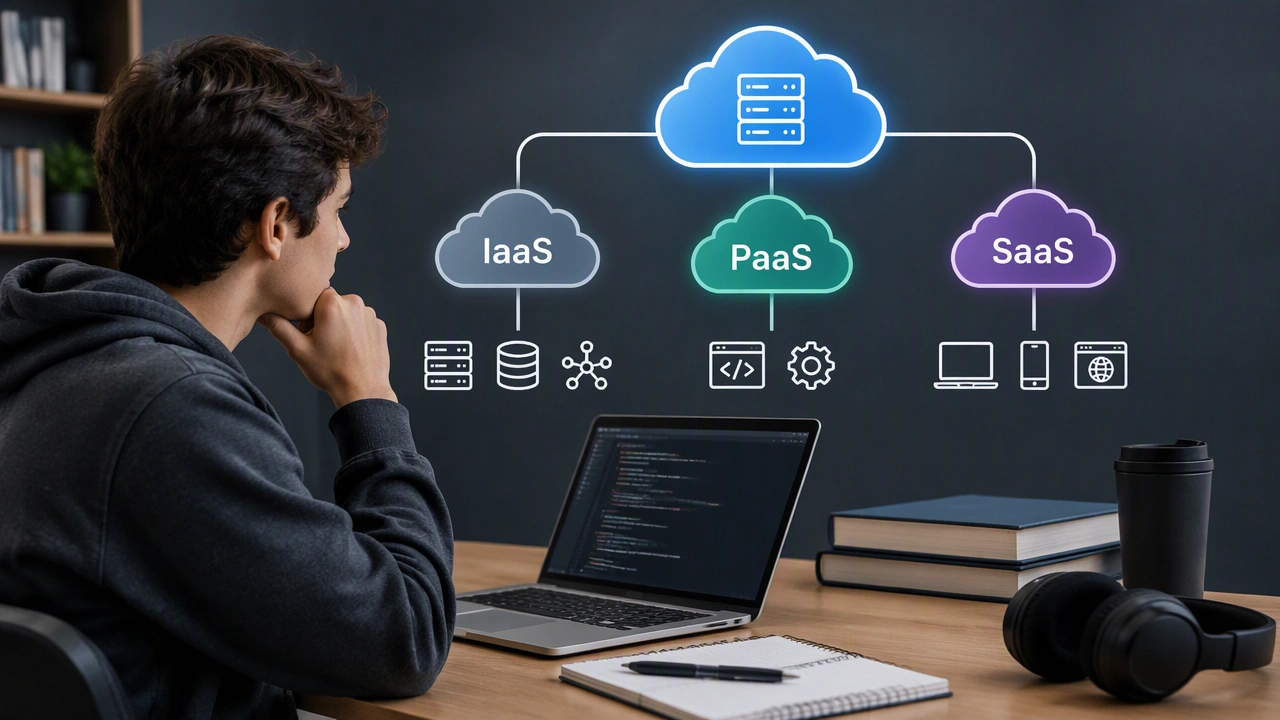
The easiest way to understand cloud service models is to think about levels of control versus convenience. Imagine you want to make a website for a student project. You could build everything from scratch, use a framework that handles the hard parts, or simply use a ready-made tool. The cloud offers the same three levels.
1. Infrastructure as a Service (IaaS)
IaaS gives you the basic building blocks: virtual servers, storage, and networking. You rent the infrastructure, but you manage the operating system, applications, and data yourself. It is like renting an empty apartment where you bring your own furniture and decide how to arrange everything.
For students, IaaS is ideal when you need full control and want to learn how systems work under the hood.
- Everyday example: Renting a virtual machine on Amazon Web Services (AWS EC2), Microsoft Azure, or Google Compute Engine to host your own web server for a capstone project.
- Use case: A networking student setting up a Linux server, configuring a database, and practicing cybersecurity configurations without risking their personal computer.
- Pros: Maximum flexibility and learning opportunity. Cons: Requires more technical knowledge to manage and secure.
2. Platform as a Service (PaaS)
PaaS provides a ready-to-use platform for building and deploying applications. The provider manages the servers, operating system, and development tools, so you can focus only on writing code. It is like renting a fully equipped workshop where all the tools are already set up, and you just need to build your product.
This model is perfect for students who want to develop software without spending time on server maintenance.
- Everyday example: Using Heroku, Google App Engine, or Microsoft Azure App Service to deploy a web app written in Python or Node.js.
- Use case: A student team building a class scheduling app. They push their code to the platform, and it automatically handles hosting, updates, and scaling during presentation day.
- Pros: Faster development and easier collaboration. Cons: Less control over the underlying infrastructure.
3. Software as a Service (SaaS)
SaaS delivers complete, ready-to-use software over the internet. You do not install or maintain anything; you just log in and use it. This is the most familiar model for most students.
- Everyday example: Gmail, Google Docs, Microsoft 365, Zoom, Slack, Canva, and Notion.
- Use case: Writing a group research paper in Google Docs where everyone edits simultaneously, comments in real time, and version history saves every change automatically.
- Pros: No installation, automatic updates, and accessible everywhere. Cons: Limited customization and dependence on the provider’s features.
Public, Private, and Hybrid Cloud: Where the Resources Live
Beyond service models, clouds are also classified by deployment:
- Public cloud: Resources are owned by a third-party provider and shared among many users over the internet. Most student tools like Google Drive and AWS free tier run on public clouds. It is cost-effective and highly scalable.
- Private cloud: Resources are dedicated to a single organization. A university might run a private cloud for sensitive research data or student records to maintain stricter control and security.
- Hybrid cloud: A mix of both. For example, a university keeps sensitive data on its private cloud but uses the public cloud for student email and collaboration tools. This balances security with flexibility.
Everyday Student Use Cases for Each Model
Understanding the models helps you pick the right tool for the task:
- For studying and collaboration, use SaaS: Store notes in OneDrive, manage citations with cloud-based reference managers, and attend online lectures via Zoom. No setup is required.
- For learning to code and building portfolios, use PaaS: Deploy your first portfolio website or machine learning model without configuring servers. Focus on your code and show a live link to future employers.
- For deep technical experiments, use IaaS: Create a virtual lab to practice network configuration, run data analysis on large datasets, or host a game server for a student club. You get hands-on experience that mirrors real IT work.
Many student projects actually combine all three. You might analyze data on an IaaS virtual machine, build the app on a PaaS platform, and present results using SaaS tools like Google Slides.
How to Choose the Right Cloud Model for Your Project
Ask yourself three simple questions before you start:
- How much control do you need? If you want to learn system administration, choose IaaS. If you just need a working app quickly, choose PaaS or SaaS.
- What is your technical comfort level and time? SaaS requires no technical setup, PaaS needs coding skills, and IaaS needs knowledge of servers and networking.
- What is your budget and scale? Most providers offer generous free tiers for students through programs like GitHub Student Pack, Azure for Students, and AWS Educate. Start free, then scale only if your project grows.
For beginners, it is sensible to start with SaaS for daily productivity, try PaaS for your first development project, and explore IaaS when you are ready for more advanced infrastructure concepts.
Cloud computing is not a single product but a flexible set of services that lets you choose the right level of support. By understanding the difference between renting infrastructure, using a managed platform, and simply logging into software, you can work more efficiently, collaborate better, and build projects that are accessible far beyond your own laptop.